SimpleAUHost: live plugin hosting without the pro-audio workflow
Live tuning and plugin hosting usually rely on professional audio tools. They are powerful, but every operator has to deal with their complexity during a live event.
I wanted an audio expert to prepare the routing, (tuning) plugins, presets, processing chains, and Stream Deck controls ahead of time. A volunteer could then run the show without learning a DAW or navigating a live-plugin host.
The operators can still handle the parts that naturally change from week to week, such as building the setlist and assigning a key to each song.
That is why I created SimpleAUHost.
SimpleAUHost is a native macOS Audio Unit host for prepared live shows. It keeps technical setup separate from the controls an operator needs during the event.
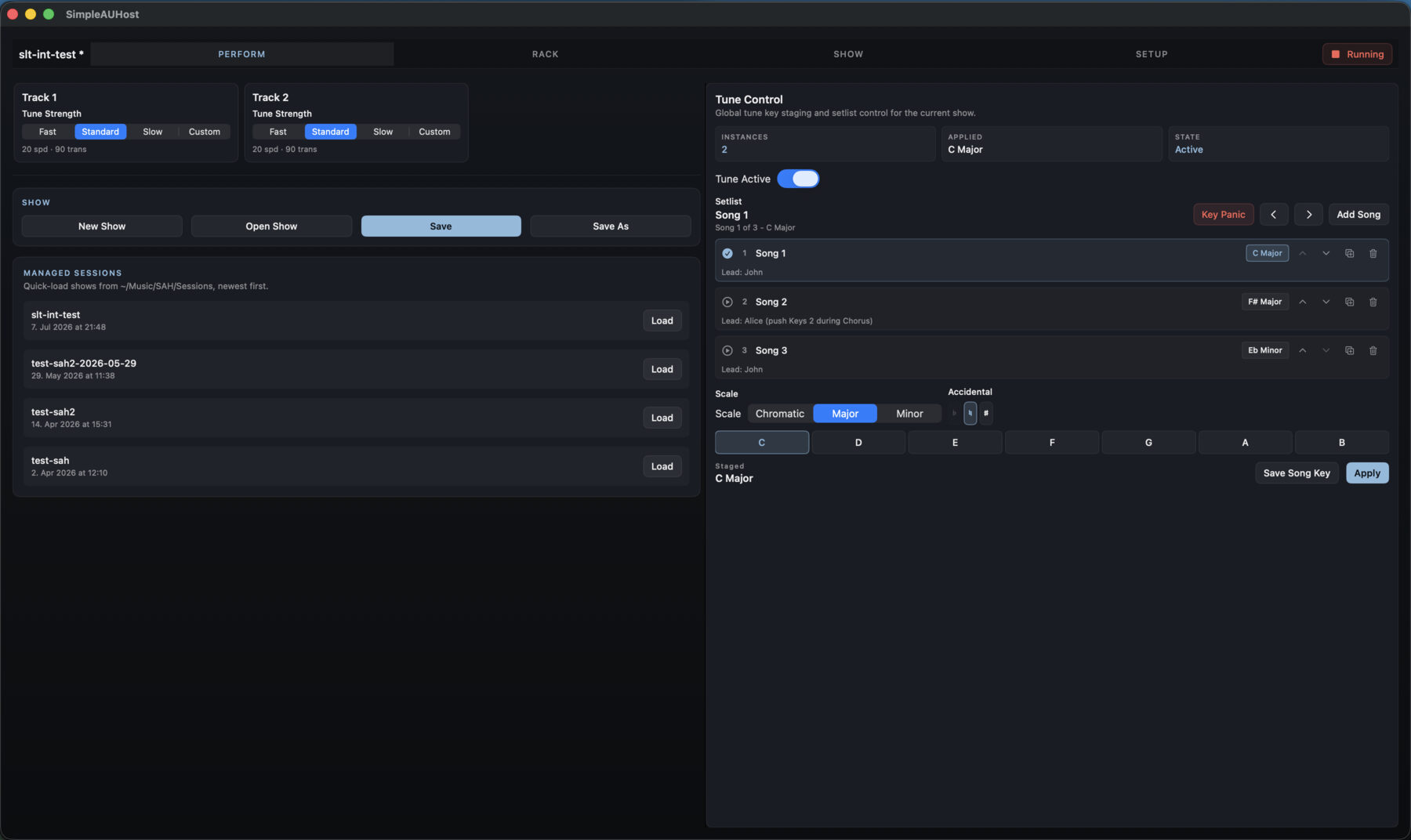
The Perform view combines tuning strength, show loading, setlist navigation, key staging, and apply controls.
Low-latency tuning and broadcast processing together#
Live tuning needs low latency. A broadcast or livestream mastering chain can be much heavier, but its latency is usually less critical.
Running both through one conventional processing buffer creates an awkward compromise. A larger buffer keeps the mastering chain stable but slows the tuning path. A very small buffer risks dropouts in the heavier chain.
SimpleAUHost solves this with per-track latency classes:
- Realtime processes latency-sensitive tracks on the hardware callback cadence.
- Buffered gives more demanding tracks larger internal processing blocks.
- Broadcast/Post provides the largest blocks and safety preroll for non-critical broadcast and mastering paths.
A realtime vocal tuning path and a heavy livestream mastering chain can run at the same time without sharing one buffer size.
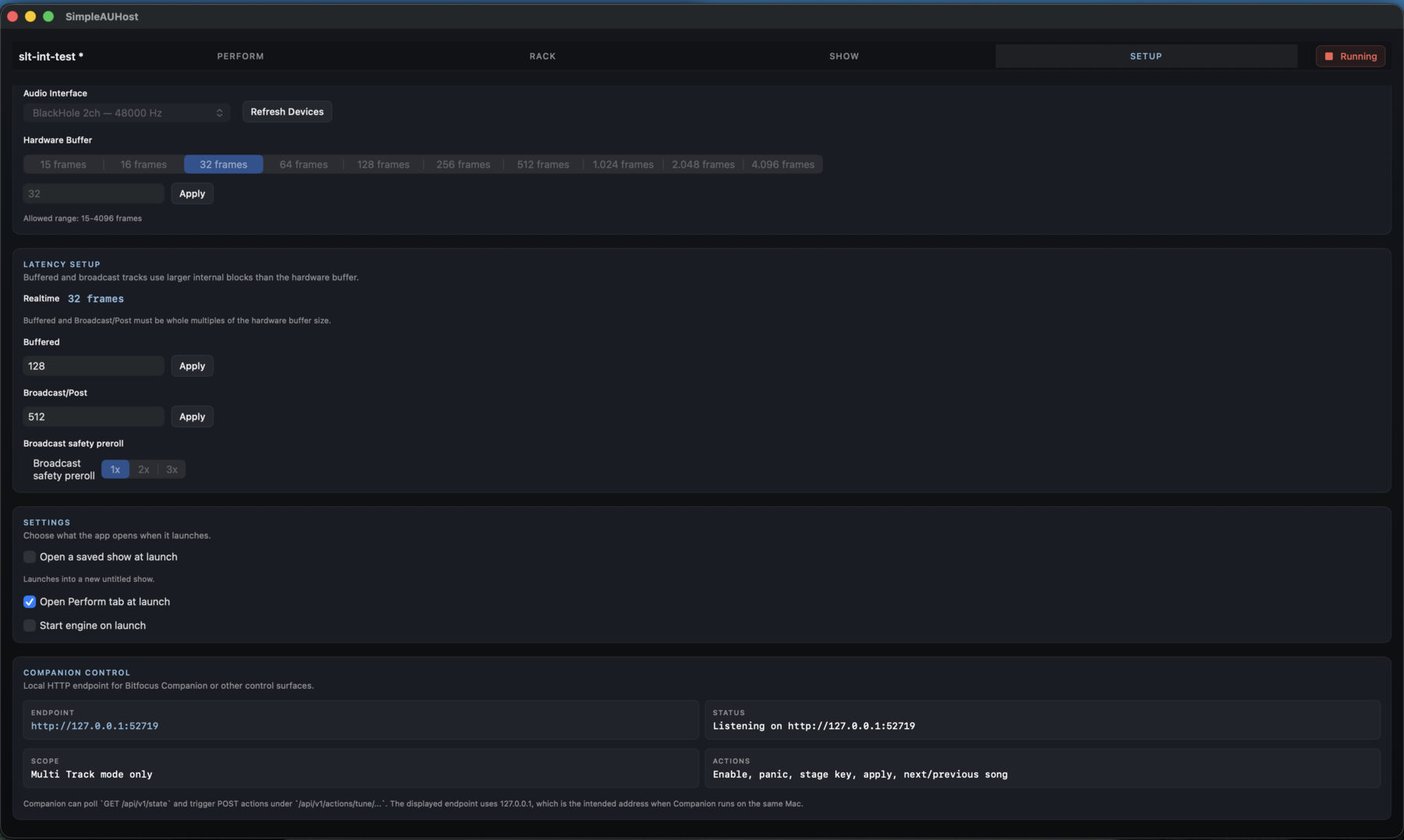
Each processing path gets its own latency and stability tradeoff instead of forcing every track to share the same buffer size.
Technical setup by an expert, weekly operation by volunteers#
A show stores its device configuration, tracks, channel routing, latency classes, plugin chains, and tuning setlist. Chain and parameter presets let an expert reuse a tested configuration.
An audio expert prepares the routing and processing once. Operators load that setup and change the song list and musical keys without rebuilding the audio system or opening individual plugin interfaces.
I built this for churches where a different volunteer may operate the system each week. They can add, name, order, duplicate, and assign keys to songs while the prepared routing and processing stay untouched.
For dedicated installations, SimpleAUHost can load the last saved show or a specific show at launch. It can open on the Perform tab and start the audio engine too. Starting the system then means opening the app.
A startup show can also act as a template. The routing and processing stay untouched while an operator creates the week’s setlist and saves it as a separate, dated show.
Advanced configuration still exists. It just happens before the event, with someone who understands it, instead of during the event with each volunteer.
A setlist instead of scenes and snapshots#
Tuning changes should follow the setlist, not force the operator to manage an abstraction built for a different purpose.
Each song in the editable list has a name, notes, and musical key. An operator builds and orders the setlist for the current event. During the show, moving to the next or previous song applies its key to the supported tuning plugins.
This avoids a separate scene or snapshot for every song and tuning state. The weekly setlist and keys live in the show, while the audio configuration stays intact.
Keys can still be staged and applied manually when the setlist changes or the operator needs to deviate from the prepared order.
Centralized tuning control#
SimpleAUHost provides dedicated parameter-level integration with Waves Tune Real-Time.
When a track contains a supported tuning plugin, the Perform view shows its live controls. Operators can switch tuning on or off, choose the key and scale, set tuning strength, and move through the setlist without opening each plugin interface.
SimpleAUHost maps those controls directly to the relevant Waves Tune Real-Time parameters, including bypass, Scale Root, Scale Type, Tune Speed, and Note Transition. Selecting a song, applying a staged key, or changing the tuning strength updates the recognized plugin instances directly instead of recalling generic plugin snapshots.
Support for Simple Live Tune is also built into the same controls. SimpleAUHost maps them to the plugin’s Bypass, Key, Scale, Retune Speed, and Note Transition parameters. Simple Live Tune is now available as a free, open-source AU and VST3 plugin for macOS. Read more about its design and live workflow in the Simple Live Tune post, or download it from the latest release.
First-class Stream Deck control#
The tuning state is also available through SimpleAUHost’s local control API and dedicated Bitfocus Companion module. The controls in the app and on a Stream Deck operate the same tuning state, setlist, and plugin instances. Available operations include:
- Tune on, off, and toggle
- Staging and applying a musical key
- Separate note, accidental, and scale controls
- Panic
- Next and previous song
- Feedback for the active and staged keys, engine state, song name, and setlist position
A Stream Deck shows what is active and what comes next. The volunteer does not have to keep the app in front of them throughout the show.
What else it can do#
- Run multiple mono or stereo tracks through one audio interface
- Route each track from selected hardware inputs to selected outputs
- Host installed Audio Unit effects in per-track insert chains
- Open embedded plugin editors
- Save sessions, chain presets, and parameter presets
- Show diagnostics for dropouts, callback timing, buffers, and worker load
SimpleAUHost requires macOS 14 Sonoma or newer. The app is currently unsigned, so macOS may ask you to approve it in Privacy & Security on first launch.
Download the current app and Companion module from the latest release, or browse the source and documentation.
Waves and Waves Tune Real-Time are trademarks of Waves Audio Ltd. SimpleAUHost is an independent project and is not affiliated with, sponsored by, or endorsed by Waves Audio Ltd.